
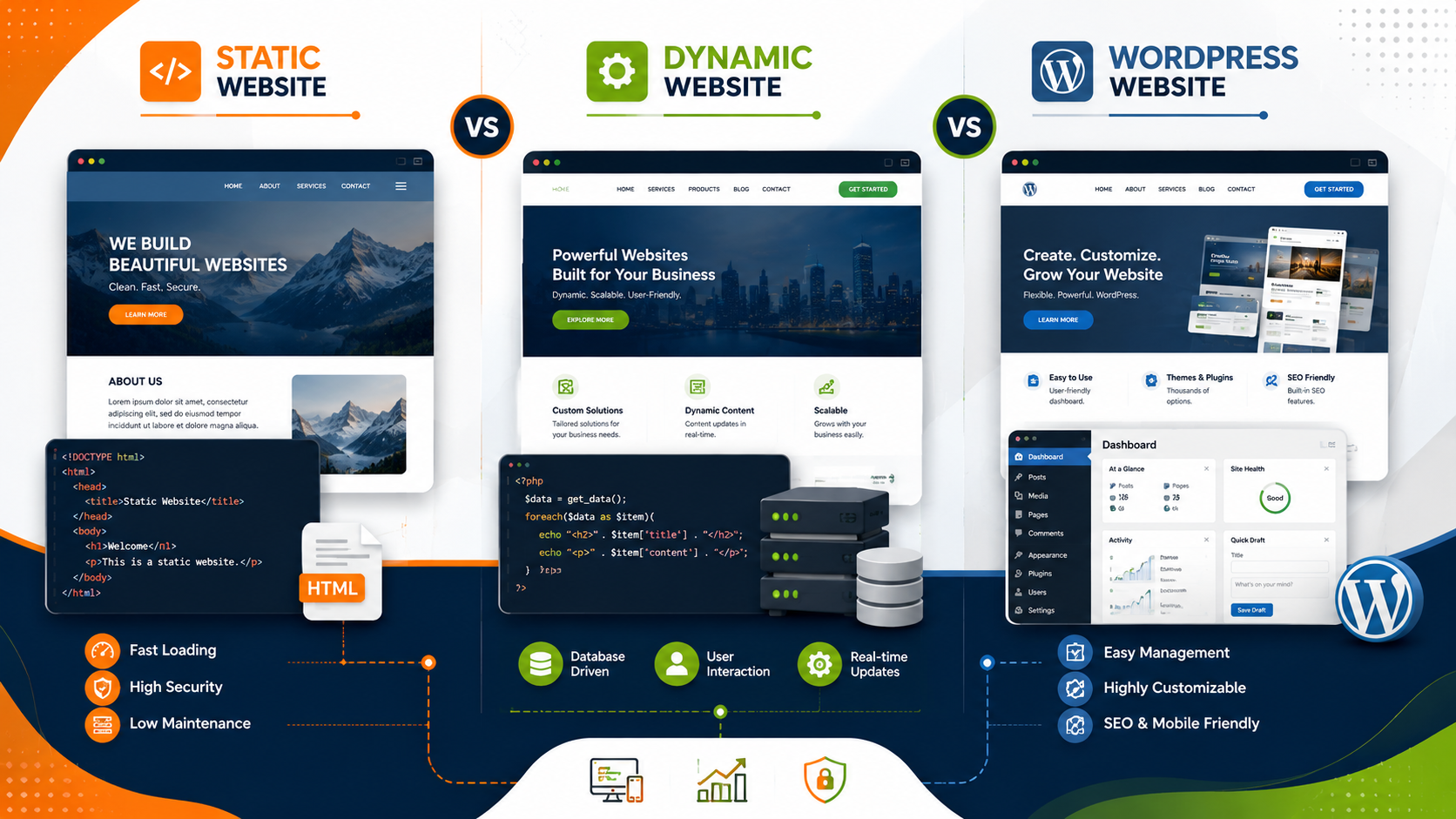
Static Vs Dynamic Vs Wordpress Website
How to Choose Between a Static, Dynamic and WordPress Website for Your Business
Last updated: August 24, 2026 Written by the Web Development Team at ImpressBSS, Chennai
Introduction
One of the first questions every business owner faces when getting online is deceptively simple: what kind of website do I actually need? The answer isn't one-size-fits-all. A static vs dynamic vs WordPress website decision shapes everything that follows — your budget, how often you can update content, how well you rank on Google, and how easily your site can grow alongside your business.
We've built and maintained websites for small businesses, startups, professionals and mid-sized companies across Chennai for years, and the most common regret we hear from clients isn't "we spent too much" — it's "we picked the wrong type of website for what we actually needed." A restaurant owner who just wants an online menu doesn't need the same setup as a growing e-commerce brand or a real estate firm managing hundreds of property listings.
This guide walks through what static, dynamic and WordPress websites actually are, where each one shines, what they cost, and how to match the right option to your business stage. The goal is to help you make a decision you won't need to undo in a year.
What is a Static Website?
A static website is built with fixed HTML, CSS and (sometimes) JavaScript files. Every visitor sees the exact same content, and nothing changes unless a developer manually edits the code and re-uploads the files. There's no database sitting behind the scenes, no login area, and no content management system.
How It Works
When someone visits a static site, the server simply sends back the same pre-built HTML file every time — there's no processing, no database query, and no dynamic rendering. This is part of why static sites load so fast and are relatively simple to host securely.
Best Use Cases
- A digital brochure or portfolio site
- A landing page for a single product or campaign
- A "coming soon" page while a bigger project is in development
- Informational sites for professionals (consultants, architects, small clinics) where the content rarely changes
Advantages
- Speed: Fewer moving parts mean faster load times, which also helps with SEO and user experience.
- Security: With no database or login system, there's a smaller attack surface for hackers to exploit.
- Lower hosting cost: Static sites can run on lightweight, inexpensive hosting.
- Simplicity: Fewer things can break, and there's less ongoing maintenance.
Limitations
- No self-service updates: Every content change — even fixing a typo — usually needs a developer.
- No dynamic features: You can't easily add things like user accounts, search filters, or a blog that updates itself.
- Doesn't scale well: As your business grows and you need more pages, forms, or functionality, a static site becomes harder to manage.
Suitable Businesses
Static websites work well for businesses in an early stage, or those with a narrow, stable set of services — think a boutique consulting practice, a single-location service provider, or a short-term campaign microsite. If you're a small business in Chennai that just needs a professional presence without frequent updates, our team can help. Take a look at our Static Website Design Services to see if this fits where your business is today.
What is a Dynamic Website?
A dynamic website generates its pages on the fly, pulling content from a database each time a page loads. This means the content a visitor sees can change based on user input, login status, real-time data, or content stored in a backend system.
Database Functionality
Dynamic sites are connected to a database (commonly MySQL, PostgreSQL, or similar) that stores information such as product listings, user records, blog posts, or transaction history. When a page is requested, the server queries the database and builds the page in real time.
User Login
Because dynamic sites can maintain sessions and user accounts, they support features like customer logins, personalized dashboards, order history, and role-based access — things a static site simply cannot do natively.
Content Management
Businesses that need frequent, structured updates — new inventory, changing prices, ongoing bookings — benefit from the flexibility of a dynamic backend. Content can be added, edited or removed without touching the underlying code, often through a custom admin panel built specifically around the business's workflow.
Best Industries
- E-commerce and online marketplaces
- Real estate portals with searchable listings
- Booking and reservation systems (clinics, salons, travel)
- SaaS products and membership-based platforms
- Job portals and directories with user-generated content
If your business needs custom functionality — a booking engine, a searchable product catalog, or a client portal — a purpose-built dynamic site is usually the right call. Our Dynamic Website Development in Chennai team has built these systems for businesses across manufacturing, retail and services.
What is a WordPress Website?
WordPress sits in an interesting middle ground. It's technically a dynamic, database-driven content management system (CMS), but it's built specifically to make content updates accessible to non-technical users while still supporting custom functionality through plugins and themes.
CMS
WordPress powers a significant share of websites worldwide because it gives business owners a familiar dashboard to manage pages, posts, images and menus without writing code.
Easy Content Updates
Once a WordPress site is set up, your team can update text, swap images, publish offers, or add new pages independently — no developer needed for routine changes. This is often the single biggest reason small and mid-sized businesses choose it.
Blogging
WordPress was originally built as a blogging platform, and it still has one of the most refined blogging workflows available — categories, tags, scheduled publishing, and comment management are all built in. This matters if content marketing is part of your growth strategy.
SEO
WordPress plays well with SEO plugins that help manage meta titles, descriptions, sitemaps and structured data, making on-page optimization more accessible without deep technical knowledge — though good SEO still requires strategy, not just plugins.
Scalability
With thousands of plugins and a large developer ecosystem, WordPress can grow with your business — from a simple brochure site to a full e-commerce store (via WooCommerce) or a membership platform, without switching platforms entirely.
Businesses that want the independence to manage their own content, without sacrificing design quality or SEO readiness, tend to do well on WordPress. Explore our WordPress Website Design Services if this sounds like the right fit for your team.
Static vs Dynamic vs WordPress Website: Comparison Table
| Factor | Static Website | Dynamic Website | WordPress Website |
|---|---|---|---|
| Content updates | Requires developer | Requires developer or custom admin panel | Self-service via dashboard |
| Best for | Simple, unchanging content | Complex custom functionality | Frequently updated content + blogging |
| Development time | Fastest | Longest (custom-built) | Moderate |
| Initial cost | Lowest | Highest | Low to moderate |
| Ongoing maintenance | Minimal | Requires developer support | Requires plugin/theme updates |
| Scalability | Limited | High (built for purpose) | High (via plugins/ecosystem) |
| User accounts/login | Not supported natively | Fully supported | Supported via plugins |
| SEO flexibility | Manual, requires care | Depends on custom build | Strong, plugin-assisted |
| Security surface | Small | Depends on build quality | Moderate — needs regular updates |
| Typical use case | Portfolio, brochure, landing page | E-commerce, booking systems, portals | Business sites, blogs, small e-commerce |
Which Website Type Is Best for Different Business Types?
- Startups validating an idea: A static or a lean WordPress site is usually enough to establish credibility without overspending before the business model is proven.
- Local service businesses (salons, clinics, consultants): WordPress hits a good balance — professional design, easy updates, and room to add a blog or bookings later.
- E-commerce brands: Depending on scale, this could mean WordPress with WooCommerce for smaller catalogs, or a fully dynamic custom-built platform for larger, more complex inventory and checkout requirements.
- Real estate, job portals, marketplaces: These almost always need a dynamic website because of the searchable, filterable, database-driven nature of the content.
- Professionals and freelancers: A static website design is often the most cost-effective way to establish an online presence without ongoing overhead.
- Established companies with active content marketing: WordPress website design is a strong fit thanks to its blogging tools and SEO ecosystem.
There's no universally "best" option — the right choice depends on how often your content changes, whether you need custom functionality, and how much ongoing management your team can realistically handle.
Cost Considerations
Cost is often the deciding factor, but it's worth looking beyond the initial build price:
- Static websites typically have the lowest upfront cost and hosting fees, but every future change adds a small recurring cost since you'll need developer support.
- Dynamic websites have the highest upfront investment because they're custom-built, but they can reduce long-term operational costs if they automate processes that would otherwise require manual work.
- WordPress websites sit in between — moderate upfront cost, plus ongoing costs for hosting, premium plugins/themes, and periodic maintenance (updates, security patches, backups). However, the ability to self-manage content usually offsets these costs over time by reducing dependency on a developer for routine changes.
A useful way to think about it: static websites cost less to build but more to change over time; dynamic and WordPress websites cost more upfront but reduce the ongoing cost of change.
Expert Recommendations from the ImpressBSS Team
Based on years of building websites for businesses across Chennai, here's the framework our team typically recommends to clients during discovery calls:
- Start with your update frequency. If your content will genuinely stay the same for months at a time, don't overpay for dynamic capability you won't use.
- Map out functionality needs before design. Businesses that need logins, bookings, or searchable catalogs should plan for a dynamic build (or WordPress with the right plugins) from day one — retrofitting this later is more expensive than building it in.
- Consider who will manage the site day-to-day. If a non-technical team member needs to publish updates regularly, WordPress website design is almost always the more practical route.
- Don't confuse "cheaper now" with "cheaper overall." We've seen businesses choose static sites to save money upfront, only to spend more over 18 months in ad-hoc developer fees than they would have with a well-planned dynamic or WordPress build.
- Plan for growth, but don't over-engineer. Building a fully custom dynamic platform for a business that isn't ready to use it yet often means paying for complexity that goes unused.
Every recommendation should be grounded in your business's actual roadmap for the next 1–3 years, not just where you are today.
Conclusion
Choosing between a static, dynamic, or WordPress website isn't about picking the "best" technology in the abstract — it's about matching the right tool to your business's current stage, budget, and growth plans. A static site can be the smart, lean choice for a new business; a dynamic platform might be essential for a company running complex online operations; and WordPress often offers the best balance of independence, flexibility, and SEO readiness for businesses that fall in between.
If you're still weighing your options, it helps to talk through your specific requirements with a team that builds all three types regularly. As a Web Design Company in Chennai, we work with businesses at every stage to figure out what actually fits — not just what sounds impressive on paper.
Frequently Asked Questions
1. Is a WordPress website considered static or dynamic? WordPress is technically a dynamic website since it pulls content from a database and generates pages on request. However, it's designed to feel simple and manageable for non-technical users, which is why it's often discussed as its own category alongside static and dynamic sites.
2. Can a static website be converted into a dynamic or WordPress website later? Yes, but it usually means rebuilding rather than simply upgrading, since static sites don't have a database or CMS foundation to build on. If you expect to need dynamic features within a year or two, it's often more cost-effective to plan for that from the start.
3. Which is better for SEO — static, dynamic, or WordPress? All three can rank well if built correctly. Static sites benefit from fast load times, dynamic sites can be optimized based on custom requirements, and WordPress offers accessible tools for managing on-page SEO. The bigger factor is usually content quality and technical implementation, not the platform alone.
4. How much does it cost to build a website in Chennai? Costs vary widely based on complexity — a simple static site costs significantly less than a custom dynamic platform, with WordPress typically falling in between. It's best to get a scoped quote based on your specific pages, features, and functionality needs.
5. What website type is best for a small business just starting out? For most small businesses starting out, a WordPress website design offers the best balance of affordability, ease of updates, and room to grow — though a static site can work well if your content and offerings are unlikely to change often in the near term.
Have questions about which website type fits your business? The ImpressBSS team is happy to walk through your specific requirements and recommend an approach based on your goals, budget, and growth plans.